
Charging port and power repairs
When a laptop stops charging, the port, the charger, the battery and the board all produce the same complaint. We test which one it is before anything is ordered, because they are very different repairs.
What we fix
- Ports that only charge at a certain angle
- Loose, wobbly or pushed-in power sockets
- USB-C ports that no longer charge
- Laptops that run on the charger but will not charge
- Damaged charger cables and bent connectors
- Charging circuit faults on the board
The symptoms, and what they usually mean
A port you have to hold at an angle, or that only works if the cable is pushed in hard, is mechanical wear or a cracked solder joint. The socket has been taking the weight of the cable for years, often with a tug every time the laptop moves.
A laptop that runs happily on the charger but reports it is not charging points at the battery or the charging circuit rather than the port. One that will not run on the charger at all, with no light anywhere, points at the charger, the port or the board.
Charging that works sometimes, or that stops when the laptop warms up, is usually a joint that is failing intermittently. Those are worth catching early, because a loose socket can short and take the charging circuit with it.
What we test first
We start with the charger, because it is the cheapest thing that fails and the easiest to mistake for something serious. We check its output, look over the cable for damage where it leaves the brick and where it enters the plug, and try the laptop on a unit we know is good.
Then the port itself. We look inside it for lint and debris, which is a common and free fix, and check whether the pins are bent, spread or blackened. We test whether the socket has movement in it when a plug is inserted.
Then the battery report and the charging circuit, to see whether the machine is receiving power and refusing to charge, or not receiving it at all. That distinction decides which repair we are quoting.
Two kinds of port, two kinds of job
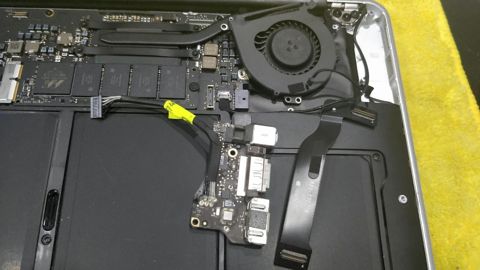
On many laptops the power socket sits on a small separate board, or on a short cable that plugs into the main board. Those are the good ones: the part is inexpensive, the repair is quick, and it does not involve the main board at all.
On others the socket is soldered directly to the motherboard. Replacing one of those means removing the old socket without lifting the pads underneath and fitting the new one cleanly, and it is exacting work, but it beats replacing a whole board.
USB-C adds another layer, because those ports handle data and video as well as power, and the negotiation between charger and laptop is controlled by a chip on the board. A USB-C laptop that will not charge is sometimes the port, sometimes that chip, and we test both.
Chargers, cables and what to avoid
Use the right charger for the machine. On barrel-connector laptops the voltage and polarity have to match, and a plug that physically fits is not proof that it should be there. Very cheap replacement chargers are a common cause of the board faults we end up repairing afterwards.
On USB-C, the wattage matters. A low-output phone charger may keep a laptop alive while it is idle and still lose ground under load, which looks like a battery fault and is not. Check what the original charger was rated at.
Keep the cable slack at the socket. Most worn ports we see were worn by the cable being pulled sideways, tripped over, or left under the weight of the laptop on a couch. A short extension lead at the wall costs less than the repair.
What it costs and how long it takes
Labour is the fixed $274 on any repair, including the $88 diagnosis, and parts are quoted and approved before ordering. If we find the charger was the whole problem, we will tell you that too, even though it is the smallest job on the page.
Most repairs are done within 72 hours. Charging boards and sockets for some models have to be ordered, which can add time, and we say so when we quote. New parts carry 12 months and workmanship 90 days.
After a port repair we charge the battery from low to full, watch the charge rate, run the laptop under load on mains and on battery, and move the cable at the socket while it charges to be sure the connection is solid.
Typical jobs
A typical job: a laptop that charges only when the cable is held up. The socket sits on a separate small board on that model, so we quote and fit the part, then charge from low to full while moving the cable to confirm the connection stays solid.
A typical example: a laptop that stopped charging after a cheap replacement charger was used. We test the original fault, check the charging circuit for damage from the substitute unit, repair what is affected and recommend a correctly rated charger.
Another typical job: a USB-C laptop that will not charge on any cable. We clear debris from the port, confirm it is not the cable, then test the port and the charging chip on the board to work out which one has failed before quoting.
Questions
Why does my laptop only charge when I hold the cable a certain way?
Is it the charger, the port or the battery?
Can a USB-C charging port be repaired?
Can I use any charger with my laptop?
How long does a charging port repair take?
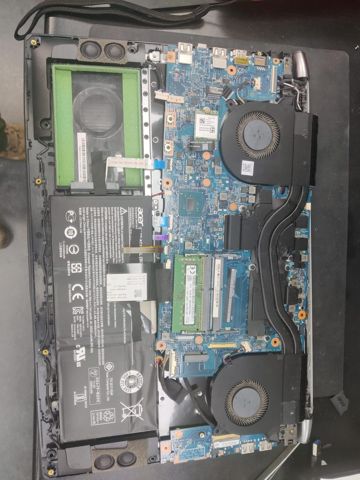
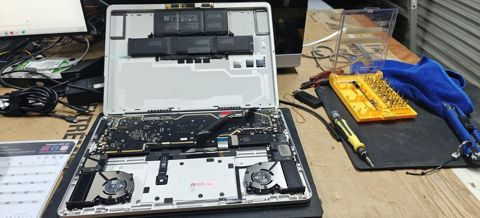
Charging port and power repairs: work in the workshop
Serving Mount Druitt and 12km around
Ready to get it fixed?
Book online in two minutes or call us. $274 fixed labour, diagnosis included.