
Video conferencing and meeting rooms
Meeting rooms that work the moment someone walks in: a screen people can read, a camera that shows the whole table, and sound that carries both ways. We set them up, and we fix the ones that have stopped behaving.
What we do
- Screens, mounts and cabling
- Conference cameras and speakerphones
- Microsoft Teams and Zoom room set-ups
- Wireless and cabled screen sharing
- Room booking displays
- Sound problems, echo and dropouts
What makes a room work
Most meeting room complaints come down to three things: people at the far end cannot hear clearly, the camera shows half the room, or nobody can get their laptop on the screen without a cable hunt. Fix those and the room gets used.
We start with the room itself, not the shopping list. Its size and shape decide the camera's field of view, where the microphone has to sit, and whether one all-in-one bar will do or the room needs separate microphones. Hard walls, glass and bare tables bounce sound around, and that is usually what makes callers say the room sounds hollow.
Screens, cameras and sound
A screen is sized against the distance of the furthest chair, not the wall it hangs on. Too small and the people at the back stop reading shared documents; too large in a small room and nobody can take it all in.
For most small rooms a single bar with camera, microphones and speakers is the simplest answer, because it is one device to power, update and support. Bigger rooms, long tables and training rooms do better with a separate camera and ceiling or table microphones, so the people at the far end are picked up evenly.
Cabling matters more than people expect. HDMI over long runs needs the right cable or an extender, USB has its own distance limits, and a table connection point saves the room from the tangle of adaptors that ends up in a drawer.
Teams, Zoom and whatever you already use
We work with the platform your business already runs on rather than pushing you to another one. That might be Microsoft Teams, Zoom, Google Meet or a mix, because your customers and suppliers all have their own.
A room can be set up as a shared device that joins meetings from a calendar invitation, or kept simple, where whoever is presenting connects their laptop and uses the room's camera and sound. The first suits rooms booked all day; the second suits a room used a few times a week, and it is cheaper to run.
If you are on Microsoft 365, room mailboxes, calendar booking and access can all be tied together. See our Microsoft 365 page for how that side fits.
Fixing rooms that already exist
Plenty of our work here is rescuing a room someone else installed, or one that was fine until an update changed something. Common culprits: a camera on an old driver, a microphone muted at the device rather than in the software, a USB cable too long for the standard, a screen on the wrong input, or Wi-Fi that cannot carry video reliably when the office is busy.
We test the room the way your staff use it: start a call, share a screen, walk to the far chair and speak. A room is only fixed when it works from that seat.
What we install and what we do not
We supply and set up the screens, cameras, microphones, speakers and the computers or room devices that drive them, and we configure the software and accounts behind them.
Mounting into some walls, running cable through ceilings and anything on the power side has its limits: fixed cabling to the telecommunications network must be done by an ACMA-registered cabler, and power work by an electrician. We tell you when a job needs either, and arrange it rather than pretending every trade is ours.
Support afterwards
Rooms drift. Firmware updates, a moved cable, a new laptop that only has USB-C, and suddenly the room has a reputation. Business customers on an ongoing arrangement get the room checked as part of regular maintenance, and the fully managed option runs through our MSP division, Managed IT Helpdesk.
Onsite work is quoted per job or per visit, and remote configuration is $179 per hour with a one-hour minimum. If a room device has to come back to the workshop, most repairs are done within 72 hours.
Typical jobs
A typical job: a boardroom where the far end keeps saying the room sounds distant. The camera bar sits below the table edge behind a laptop, so it is picking up the room instead of the speakers. Repositioning and a mount fix it, and the room is tested from the far chair before we leave.
A typical example: a training room with a screen nobody can connect to, because each visitor brings a different laptop. A table connection point with the common connectors, plus a wireless option for visitors, and connecting stops being the first ten minutes of every session.
Another typical job: a small office wanting one room to handle client calls, staff calls and the occasional presentation. A single all-in-one bar, a correctly sized screen, and the room added to the calendar so staff can book it.
Questions
Do I need Teams Rooms or just a screen and a camera?
Why does the far end say they cannot hear us properly?
Can you fit a room out that another company installed?
How much does a meeting room cost to set up?
Will it work if our internet drops out?
Video conferencing: work we have done
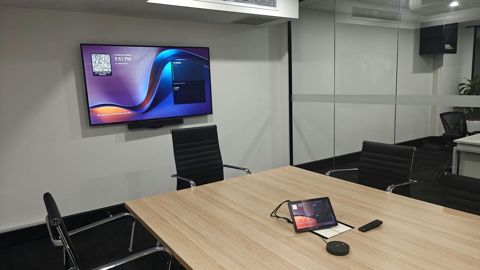
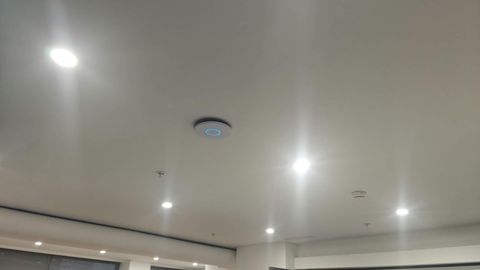
Serving Mount Druitt and 12km around
Ready to get it sorted?
Call for a chat about what you need. Onsite and business work is quoted per job or per visit.