
Onsite IT support for small business
Hands-on IT help at your premises, from someone who has been doing it in Western Sydney since 1999. You get the same person every visit, who already knows your setup and answers the phone when you call. No contract, no account manager, and no ticket queue.
What we do
- Computers that have stopped working and are stopping someone from working
- New starters set up and departing staff offboarded properly
- Network, Wi-Fi, switch and cabling faults
- Microsoft 365, email, shared files and permissions
- Printers, scanners, copiers and point-of-sale hardware
- Servers and NAS devices maintained, patched and checked
- Backups that need testing rather than assuming
- Internet dropouts and slow connections traced properly
- Moving desks, adding desks, opening a second site
- The tidy-up nobody has had time to do
What onsite support actually looks like
Plenty of small businesses do not want a managed IT contract. They want someone who turns up, fixes the thing that is stopping work, explains what happened in plain language, and leaves them alone until the next time. That is what this is.
You call or message when something breaks. We work out over the phone whether it is a ten-minute remote support job or genuinely needs someone there, because driving out for something that could have been fixed from a desk wastes your money and our afternoon. If it needs a visit, we agree a time, arrive with the parts and tools likely to be needed, and deal with it.
Because the workshop is local, a machine that cannot be fixed on the spot comes back with us, gets repaired properly on the bench, and returns to the desk it came from. You are not couriering a computer interstate and waiting ten days to hear about it.
And you deal with the same person each time. That sounds like a small thing until you have explained your server, your line-of-business software and the reason the accounts PC is special to four different technicians in a year.
When onsite is the right call, and when it is not
Onsite is the right answer when the problem is physical: a machine that will not power on, a cable that has been kicked out, a printer that needs opening, a switch that has died, a new desk that needs building. It is also right when several things need doing at once and you would rather they were all sorted in one visit.
It is the right answer for anything involving a new person starting, because a laptop, a phone, an email account, file access and a desk are five jobs that are far quicker done together than over three phone calls.
Remote is usually better for software: Windows and Office problems, email that has stopped, a printer queue, a password, an application that will not update. It is faster to start, it costs less, and nobody has to wait around for a van. Remote support is $179 per hour with a one hour minimum.
We will tell you which one your problem is before you commit to either. If you call about something that turns out to be a five-minute remote fix, we would rather do it that way and keep the relationship than book a visit you did not need.
New starters and people leaving
A new starter is the most predictable IT job in any business, and the one most often left until the morning they walk in. Given notice, we have the laptop ready: Windows set up, Microsoft 365 licensed and signed in, email working, access to the shared drives and nothing else, printers installed, and the machine named so it can be identified later.
Offboarding matters more and gets less attention. When someone leaves, their account needs disabling rather than deleting straight away, their mailbox converting or delegating so the business keeps the correspondence, their files moving out of a personal OneDrive that is about to be wiped, and their access to anything shared removed. Their laptop needs collecting, wiping and reissuing.
The part businesses get caught by is the accounts nobody wrote down: the router login, the domain registrar, the social media, the machine on the shop floor with a local password. We help you build that list while the person is still there, rather than after.
If you want this handled formally and continuously, that is what a managed plan is for. See managed IT.
The unglamorous work that prevents the emergencies
Most of the urgent calls we get were avoidable a few months earlier. A drive that had been reporting errors for weeks. A machine so packed with dust it had been throttling all summer. A backup that had been failing silently since a password change. A firewall still running firmware from three years ago.
So on a visit we will look at the things that are heading for trouble, not just the thing that broke: drive health, temperatures and dust, disk space, Windows and firmware updates, whether the backup actually ran and whether anyone has ever restored from it, and whether the machines still have support and security updates available at all.
You get told what we found and what it would cost to deal with, and you decide. Nothing gets replaced because it is old. Plenty of equipment runs perfectly for years past the point a sales-driven provider would have replaced it, and we will say so.
Networks, internet and the things everyone blames
"The internet is slow" is almost never the internet. It is usually Wi-Fi coverage, a cheap modem doing a job it was never designed for, a switch that has started failing, or one machine saturating the connection. Onsite is where that gets diagnosed, because it needs testing in the place where it happens.
We can trace it properly, then tell you whether it needs a better access point, a data point run to where the device actually sits, a different modem, or a different internet service. See Wi-Fi installation, data cabling and NBN installation for those.
If downtime genuinely costs you money, it is worth talking about a second connection on 4G or 5G that takes over automatically when the main one drops. That is covered under backup and disaster recovery.
How quickly we can get there
Honestly: it depends on the day and where you are. We are one workshop covering about 12km around Mount Druitt, not a company with vans idling around the district. Some days we can be there within a couple of hours. On a day that is already full, it might be tomorrow morning.
What we will do is tell you the truth when you call, so you can make your own decision rather than waiting on a promise that was never realistic. If it is urgent and we cannot get there fast enough, we will say so, and often we can keep you working remotely in the meantime.
If your business genuinely cannot tolerate that uncertainty, then what you need is a managed plan with an agreed response time rather than ad-hoc onsite work, and our MSP division exists for exactly that. We would rather point you there than sell you something that does not fit.
What it costs
Onsite business work is quoted per job or per visit. There is no contract, no minimum term, and no monthly fee. You call, we tell you what it will cost, and you decide.
For ongoing work you can agree a block of hours or a regular scheduled visit, which suits businesses that would rather have someone walk through every month than wait for something to break. You can stop that any time.
The $274 fixed labour special applies to computer repairs done at the workshop, and that includes business machines. Onsite time is quoted separately, because an hour at your premises and a repair on the bench are different things. Parts are always quoted and approved before anything is ordered.
Remote support is $179 per hour with a one hour minimum, and a lot of what businesses call us about can be done that way.
Ad-hoc support or a managed plan?
Ad-hoc onsite support suits a business with, roughly, under ten staff, no server or one simple one, and a tolerance for the occasional wait. You pay only when you need us, which over a year is usually less than a monthly plan.
A managed plan starts making sense when downtime costs real money, when you have staff who cannot work if one system is down, when you are being asked about cyber security by insurers or customers, or when you simply want someone else to own the problem. That means monitoring, patching, agreed response times and someone watching the backups without being asked.
We do both, but not from the same place. Managed plans run through our MSP division, Managed IT Helpdesk. Ad-hoc onsite work runs through COMPwize. Tell us which situation you are in and we will tell you honestly which one you want — including telling you that you do not need a plan yet, if you do not.
What to have ready when you call
What has stopped working, who it affects, and whether anyone can still do their job. That last one sets the priority more than anything else.
Any error message, photographed rather than paraphrased. "It says something about a disk" and the actual message are very different starting points.
Whether anything changed recently — a new modem, a power failure, an update, a new staff member, a move. Most faults trace back to a change, and knowing it saves an hour of looking.
And whether there is anything on the machine that is not backed up. If there is, say so at the start. It changes the order we do everything in.
Typical jobs
A typical job: a workstation that will not boot on the morning of a deadline. We get the person working on another machine first, then deal with the failed one — repaired on site if the part is in the van, otherwise back to the bench and returned to their desk.
A typical example: a new employee starting Monday. Laptop set up and named, Microsoft 365 licensed, email working, access to the right shared folders and nothing else, printers installed, and the desk ready before they walk in.
Another typical job: a printer that has stopped talking to half the office after a modem change. The printer gets a fixed address so it stops moving, and every computer gets pointed back at it properly rather than one desk at a time.
A quieter one: a monthly visit where nothing is broken. Drive health and temperatures checked, updates applied, dust cleared, backups tested by actually restoring a file, and a short list of what is heading for trouble in the next six months.
Questions
Do you lock us into a contract?
How quickly can you come out?
Do you offer managed IT plans?
What does an onsite visit cost?
Can you fix it without coming out?
Do you work on Macs and Linux?
Can you set up a new employee before they start?
We have no idea what we have. Can you audit it?
Do you support businesses outside Mount Druitt?
Will we get the same person each time?
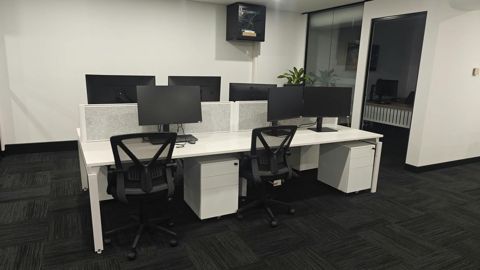
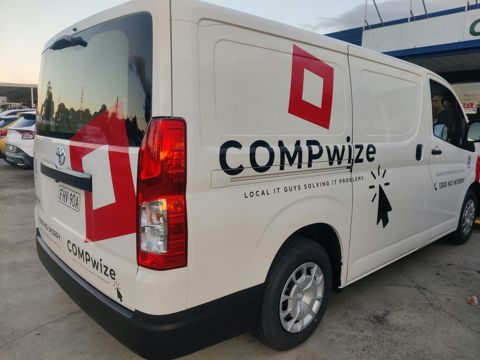
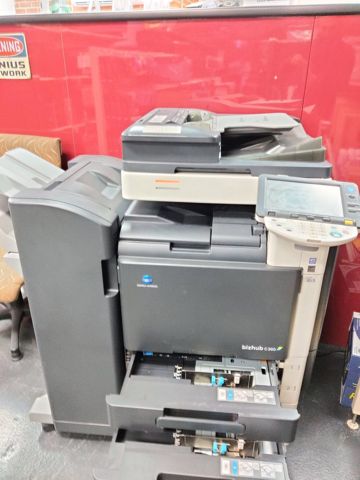
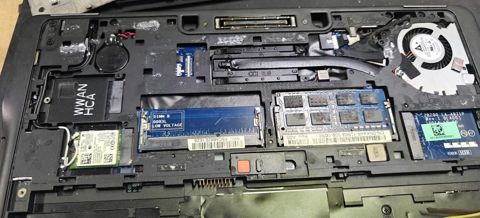
Onsite IT support: work we have done

Serving Mount Druitt and 12km around
Ready to get it sorted?
Call for a chat about what you need. Onsite and business work is quoted per job or per visit.