
Business network and security
Small businesses get attacked constantly, not because anyone singled them out, but because the attacks are automated and cheap to run at scale. The good news is that most of what stops them is unglamorous, affordable and achievable in an afternoon.
What we do
- Firewalls and routers configured properly, not left on defaults
- Wi-Fi secured, with a separate network for guests
- Multi-factor authentication turned on across Microsoft 365
- Admin accounts separated from everyday accounts
- Patching kept current on computers, servers and network gear
- Old equipment identified before it stops getting security updates
- Remote access secured properly instead of a port left open
- Staff shown what a phishing email actually looks like
- Devices from former staff and unknown gear removed from the network
- A plain-language report on where you stand
What actually happens to small businesses
Nobody sits and chooses a business in Western Sydney to attack. Systems scan the entire internet continuously, looking for anything with a known weakness or a guessable password, and they find it within minutes of it appearing. The targeting is automatic and the scale is why small businesses are hit as often as large ones.
The way in is usually one of a handful of things: a password reused from somewhere that was breached years ago, an email convincing enough that someone clicked it, remote access exposed to the internet without protection, or a device that stopped receiving security updates and nobody noticed.
What follows is rarely dramatic at first. An attacker sits quietly in a mailbox reading correspondence, then sends an invoice with different bank details at exactly the right moment in a real conversation. That one alone costs Australian businesses a great deal every year, and it never looks like a hack.
So this page is not about fear. It is about the specific, boring things that remove most of the opportunity.
Multi-factor authentication, before anything else
If you do one thing, do this. A password alone is a single point of failure, and passwords leak constantly through breaches of unrelated services. Multi-factor authentication means that knowing the password is not enough — a code or an approval on a phone is needed too.
It is free with Microsoft 365, and it prevents the overwhelming majority of account takeovers, which are the entry point for the invoice fraud described above. There is no security spend with a better return.
The friction is real but smaller than people expect: on a trusted computer it prompts occasionally, not constantly. Where a role genuinely cannot use a phone, there are other options, and we can work those through.
It has to cover everyone, including the director, because the director's mailbox is the one an attacker most wants and the account most often exempted.
The firewall and what is exposed to the internet
Most small offices run whatever router the internet provider supplied, on its default settings, with its default admin password. That is fine until something needs to be reachable from outside — and then it is usually done by opening a port straight to the machine, which is how a great many businesses get compromised.
Remote access should go through a VPN or a proper remote access service, not an open port with a password on the other side. Exposed remote desktop is scanned for and attacked within minutes of being switched on.
We check what is actually reachable from the outside, close what should not be, and configure remote access properly where you need it. The admin password on the router itself gets changed and written down somewhere you can find it, which sounds trivial until you meet the number of businesses using the sticker on the bottom.
Wi-Fi, guests and the devices you forgot about
A single Wi-Fi network shared by staff laptops, the customer sitting in reception, the security cameras and the smart TV means anything that gets onto that network can see everything else. Guests should be on a separate network that reaches the internet and nothing of yours.
The same goes for equipment nobody thinks of as a computer: cameras, door controllers, point-of-sale terminals, that spare machine running one old application. They rarely get updates and they are a common way in. They should be separated from the systems that matter.
Then there is the password everyone knows. If the Wi-Fi password has not changed since before two staff members left, it is not really a password. Changing it periodically, or putting staff devices on something that does not rely on a shared secret, closes that quietly.
See Wi-Fi installation for the coverage side and data cabling where wired is the better answer.
Patching and equipment that has quietly expired
Most successful attacks use a weakness that was fixed months or years earlier. Patching is the least interesting security work and one of the most effective.
It needs to cover more than Windows: the applications people use daily, the browser, and the firmware on the router, switches, access points and printers — that last group being the one almost nobody updates.
The harder problem is equipment that no longer receives updates at all. An operating system past its support date does not get fixes for new weaknesses, ever. It usually still works fine, which is what makes it dangerous, and "it runs perfectly" is not a security position.
We will tell you what has expired, what expires soon, and what it costs to deal with, so you can plan it rather than be surprised. We do not recommend replacing equipment because it is old — only because it has stopped being safe or supported.
The people part
Technology stops a lot, and then someone gets a convincing email. Modern phishing is well written, correctly branded, and often arrives inside a real conversation from a supplier whose mailbox was already compromised.
Two habits protect a business more than any product. First: any change to bank details gets verified by phoning the supplier on a number you already had — never a number in the email. Second: nobody gets in trouble for reporting a mistake. Attacks succeed in the hours between someone realising and someone admitting it.
We are happy to sit with your staff for half an hour and show them real examples, including the ones that fooled people. It is not a course, and it does not need to be.
Where this connects to the rest
Security only works alongside backups. Prevention reduces how often something happens; backups determine whether it ends the business. Both, or neither is worth much — see backup and disaster recovery.
If you are being asked about security by an insurer, a customer or a contract, there is a recognised baseline in Australia called the Essential Eight, and that is worth working against rather than inventing your own list. See cyber security and the Essential Eight.
And the ongoing part — patching, monitoring, checking — is what a managed plan exists for. Ad-hoc security work fixes the state of things today; keeping it that way needs someone whose job it is.
How we work on this
We start by looking at what you have: what is exposed to the internet, whether MFA is on, what is out of support, how the Wi-Fi is arranged, what is on the network that you cannot identify, and whether backups would survive an attack.
You get that in plain language, with what matters most at the top and a cost against each. No scores out of ten, no product pitch. Some of it will be free and take an afternoon.
Then we fix what you want fixed, in order. Most businesses do the free high-impact items first — MFA, admin separation, closing exposed access, changing default passwords — and plan the rest across a few months.
This work is quoted per job or per visit. We are not a security vendor and we do not sell a product that claims to solve this.
Typical jobs
A typical job: a business with remote desktop exposed straight to the internet so the owner could work from home. Replaced with a VPN, closed at the firewall, and MFA switched on across Microsoft 365 in the same visit.
A typical example: one Wi-Fi network shared by staff, customers, cameras and a point-of-sale terminal. Split into separate networks so a guest device can reach the internet and nothing else.
Another typical job: a review that found four computers past their operating system's support date and a firewall running firmware from three years earlier. Prioritised, costed, and worked through over two months rather than all at once.
A quieter one: half an hour with staff going through real phishing emails, including the supplier invoice that nearly worked, and agreeing the rule that bank detail changes are always confirmed by phone.
Questions
We're too small to be a target. Is this really necessary?
What is the single most valuable thing we can do?
Is the modem from our internet provider good enough?
Someone clicked a link. What now?
Can you guarantee we won't be breached?
Do we need antivirus as well?
We have an old PC running one important program. Is that a problem?
How do we handle an invoice with changed bank details?
Do you do security for compliance or insurance questionnaires?
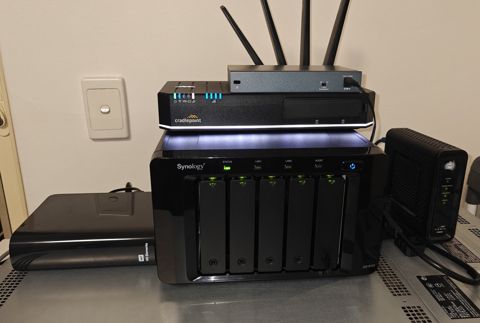
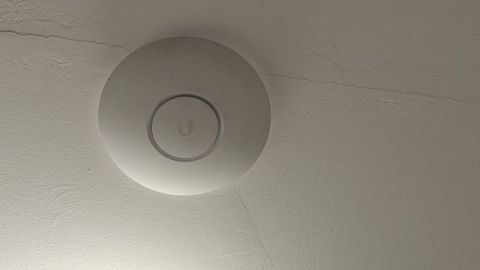
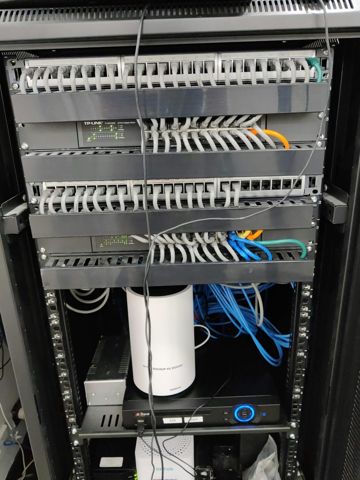
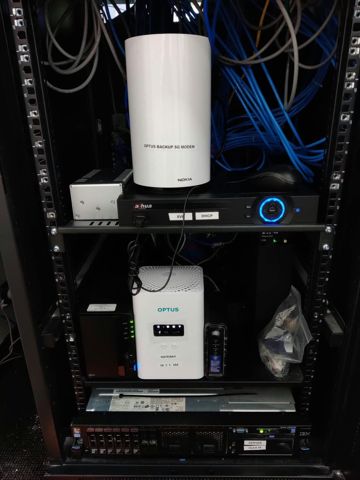
Network & security: work we have done
Serving Mount Druitt and 12km around
Ready to get it sorted?
Call for a chat about what you need. Onsite and business work is quoted per job or per visit.