
Liquid damage repair
Spilled coffee, water or a drink on your laptop? The sooner it's opened up and cleaned, the better the chance of saving it.
What we fix
- Keyboard and trackpad spills
- Laptops that won't turn on after a spill
- Corrosion clean-up
- Getting your files off a liquid-damaged machine
Price
| Liquid damage repair Strip-down, ultrasonic-safe clean, corrosion treatment and reassembly | $274 labour Any damaged parts extra |
Includes the $88 diagnosis. Pickup and delivery included. All prices
What a spill does inside a laptop
The liquid itself is rarely what kills a laptop. The damage comes from electricity flowing through a wet board, which can short components the moment it's powered, and from corrosion that keeps spreading for days afterwards, even once everything looks dry.
Sugary drinks, coffee with milk and juice are the worst, because they leave a sticky, conductive residue behind. On most laptops, and on every MacBook, the main board sits under the keyboard, so a spill on the keys can reach it quickly.
Signs of liquid damage
Some laptops die on the spot. Others keep working, then develop sticky or repeating keys, keys that type the wrong letters, an erratic trackpad, patches on the screen, or a battery that stops charging.
A laptop that seemed fine after a spill and then stops working days or weeks later is a common story. That's corrosion at work, which is why it's worth having the machine opened and cleaned even if it survived the first few minutes.
Sometimes the only visible clue is a faint sticky film under a key, or a white or green crust around a port or the charging connector. Both mean liquid reached the inside.
How we treat a liquid-damaged laptop
We disconnect the battery first, then take the laptop apart and inspect the board under magnification for residue and corrosion, paying close attention to the charging circuit and the connectors around the keyboard and screen.
Affected areas are cleaned with isopropyl alcohol, corrosion is removed, and the board is dried properly. We check it for shorts before it's powered back on, then replace anything that's failed, often the keyboard, which traps liquid under the keys. Labour is the fixed $274, which includes the $88 diagnosis, and any parts are quoted before ordering.
Testing covers every key, the trackpad, each port, the camera, audio, and a full charge and discharge. We also leave it running for an extended period, because liquid faults can be intermittent.
First steps after a spill
Unplug the charger, then hold the power button until the laptop switches off. Tip it upside down with the lid open in a tent shape so liquid drains away from the board, and take out any removable battery.
Don't turn it on to check whether it still works, don't charge it, and don't use a hair dryer or heater, which can push liquid further in and warp parts. When you book, tell us what was spilled and roughly how much, as it changes what we look for.
Typical jobs
A typical job: a laptop that had milky coffee spilled across the keyboard and switched off straight away. We disconnect the battery, open it up, clean the residue from the board with isopropyl alcohol, check for shorts and replace the keyboard. Most repairs like this are done within 72 hours, although board parts that need ordering can add time.
A typical example: a laptop that seemed to survive a glass of water, then developed repeating keys and stopped charging weeks later. Inside, corrosion has reached the charging circuit. We clean it, replace the failed components where practical, and run it for an extended period to catch intermittent faults.
Another typical job: a MacBook with a juice spill where the files matter more than the laptop. Because the storage is soldered to the board, we clean and repair the board with the aim of getting it running long enough to copy the data off, then talk through whether the machine is worth fixing further.
When it can't be saved
Some boards are too badly corroded, or have lost a chip that isn't practical to replace. We'll tell you once we've inspected it, before you've spent money on parts.
If your files matter more than the laptop, say so at the start. On MacBooks and many newer Windows laptops the storage is soldered to the board and often encrypted, so getting data off can depend on getting the board running again, even briefly.
Either way, you'll know what we found and what it's likely to cost before you decide.
Questions
What should I do right now?
Should I put it in rice?
How long do I have after spilling liquid on my laptop?
Can you get my files off a laptop that got wet?
Why did my laptop stop working days after the spill?
How long does a liquid damage repair take?
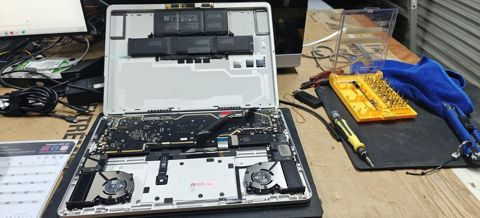
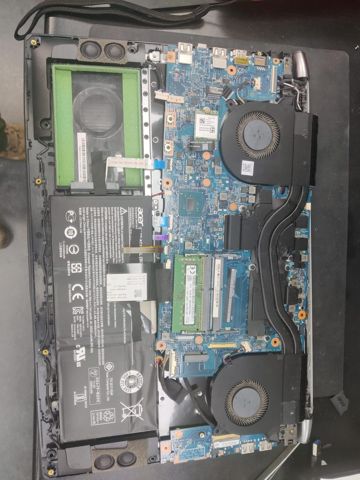
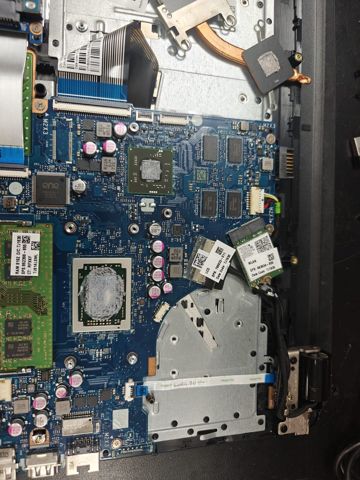
Liquid damage: work in the workshop
Serving Mount Druitt and 12km around
Ready to get it fixed?
Book online in two minutes or call us. $274 fixed labour, diagnosis included.