
Office IT relocations
Moving an office is mostly logistics until the first morning in the new place, when it becomes an IT problem. The parts that go wrong are almost always the ones with long lead times, booked too late. Start this early and it is a smooth weekend.
What we do
- A plan with dates, working backwards from the day you open
- Internet at the new site, ordered early enough to be there
- Data cabling and points where the desks are actually going
- Comms cabinet installed, patched and labelled
- Wi-Fi designed for the new floor, not the old one
- Servers and NAS moved and brought back up safely
- Every workstation disconnected, moved, reconnected and tested
- Printers and copiers reinstalled with their settings intact
- Phones and video conferencing working on day one
- The old site stripped, wiped and left clean for handover
The one thing that sinks office moves
Internet at the new premises. Everything else can be solved with effort on the weekend; a connection that is not installed cannot be conjured on Monday morning.
Lead times vary enormously depending on what is already in the building. If the new site has an existing service and the technology suits you, it can be quick. If it needs new infrastructure, a lead-in, or work in a shared building, it can run to many weeks — and building access, strata approval and the landlord's contractor all add to it.
So this is the first phone call, not the last. As soon as the lease is signed, the connection gets ordered and we find out what is actually in the building. If the date cannot be met, we know early enough to bridge it with a 4G or 5G service rather than discovering it three days out.
We also do not cancel the old connection until the new one is working. Overlapping by a fortnight costs a small amount and removes the worst possible failure mode.
Plan the desks before the cabling
The second most expensive mistake is cabling a floor to a layout that changes. Data points get run, walls get closed, and then the desks end up somewhere else — so the office runs on extension leads and a cable across a walkway.
Before anything is run, we want the actual floor plan with desks, printers, the copier, the comms cabinet, any wall screens, the point-of-sale positions and where the Wi-Fi access points will sit. Not roughly. Where they will be.
Then it gets cabled once, with a couple of spare points in the obvious places — spares are cheap while the walls are open and expensive afterwards. See data cabling.
Cabling in walls and ceilings is done by an ACMA-registered cabler. That is a legal requirement in Australia, not a preference.
The comms cabinet
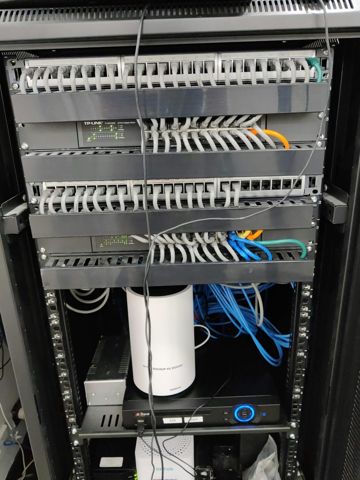
Every office move is an opportunity to stop running the network off a shelf. A wall-mounted cabinet with the modem, firewall, switch and patch panel in it, cabled tidily and labelled, is not cosmetic — it is the difference between finding a fault in ten minutes and half a day.
Labelling is the part people skip and regret. Every data point numbered at both ends, every patch lead traceable, and a photo of the finished cabinet kept somewhere you can find it.
Think about where it goes: ventilated, not in direct sun, not in the room someone will later turn into an office, with power nearby and reachable without moving furniture. A cabinet installed somewhere inconvenient gets worked around for years.
Moving servers, NAS and the things that hold your data
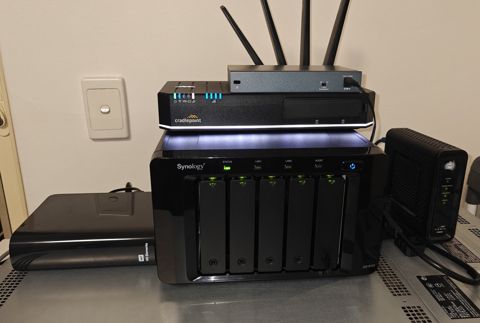
Servers and NAS units are the highest-risk items in the move, because they hold data and because drives dislike being moved. Anything with spinning disks has a failure rate that goes up after a shake.
So before the move: a verified backup, and a restore test. Not a status screen — an actual file pulled back. If a drive does not survive the trip, that backup is the entire difference between an inconvenience and a catastrophe. See backup and disaster recovery.
Then a clean shutdown rather than pulling power, transport that is not the back of a van with the rest of the furniture, and a careful power-up at the other end with time to check before anyone depends on it.
Bring them up in order: internet, firewall, switch, server, then workstations. Doing it in the wrong order produces an hour of confusing faults that fix themselves once the order is right.
Workstations, printers and the settings nobody records
Moving a computer is easy. What costs the morning is everything around it: which monitor arrangement someone had, which printer was their default, the scanner shortcut, the mapped drive, the label printer on a serial port, the machine that has to stay on the old software version.
We photograph desks before disconnecting and record what matters, then set them back up the same way rather than approximately. People are far more productive on a desk that is as they left it.
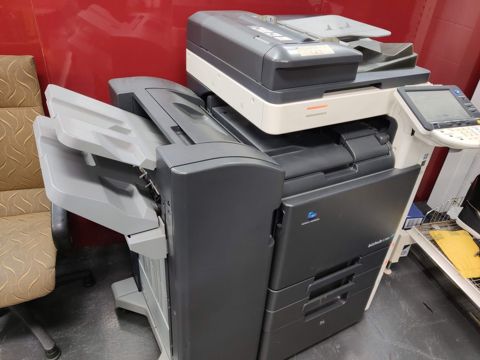
Copiers are their own job. Their configuration — addresses, scan destinations, address book, user codes, finisher settings — should be recorded before the move and restored after, or scanning does not work for a week. See printer and copier installation.
Where the machine is leased, the supplier usually has requirements about who moves it, and we work in with that rather than around it.
Timing, and what happens on the day
Most small office moves run over a weekend: cabling and network in place beforehand, equipment moved Friday evening or Saturday, systems up and tested Sunday, and someone on site Monday morning for the inevitable small things.
That Monday presence matters more than it sounds. There are always three or four items nobody could have predicted — a printer that needs a different address, a staff member whose drive mapping did not follow, a phone at a desk that changed at the last minute. Having someone there turns those into ten-minute fixes rather than a bad first impression of the new office.
Before anyone arrives we test properly: internet, Wi-Fi in every corner including the far one, printing from several machines, scanning to where it should go, phones in and out, video conferencing in the meeting room, and access to the shared files from more than one desk.
Where the business genuinely cannot stop, it can be staged — a group at a time over a week, with both sites running. It costs more and it is sometimes the right answer.
Leaving the old site properly
The old premises needs stripping: your cabling and equipment removed, anything belonging to the landlord left as it was, and the condition of the space matching what the lease requires so the bond is not an argument.
Wipe anything that held data before it leaves, particularly copiers with hard drives and any machine being sold, donated or disposed of. That is easy to do then and impossible afterwards.
And update the address everywhere it appears: Google Business Profile, your website, invoices, letterhead, email signatures, and the directories that carry it. An old address on Google is a genuine source of lost business, and it is the one everyone forgets in the first busy fortnight.
How it is quoted
Per job, after we have seen the new site or at least its floor plan. There are too many variables for a standard price: distance, number of desks, whether there is a server, what cabling exists, what the building allows and how much of it happens out of hours.
The earlier you involve us, the cheaper it tends to be, because the expensive parts of a move are the ones done in a rush. A connection ordered six weeks out costs what it costs; the same connection needed in four days costs a temporary service and a lot of goodwill.
Typical jobs
A typical job: an office of twelve moving five kilometres. Connection ordered the week the lease was signed, cabling run to the agreed floor plan, comms cabinet installed and labelled, equipment moved Saturday, everything tested Sunday, and someone on site Monday for the last few items.
A typical example: a new site where the connection could not be delivered before the move date. Bridged with a 4G service for three weeks so the business traded normally, then switched across when the fixed line was installed.
Another typical job: a move where the server was the only copy of the accounting data. Backup verified with a real restore test before it was unplugged, which is the step that makes the rest of the day low-risk.
A quieter one: a strip-out of the old premises — cabling removed, copier hard drive wiped before collection, and the space left as the lease required.
Questions
How far ahead should we start planning the IT?
How long does the internet take at a new site?
Should we cancel the old internet service straight away?
Can you move our server safely?
Do we need new cabling, or can we use what's there?
Can you do the move over a weekend?
What about our copier?
Can you handle the phones too?
What do we need to do at the old site?
Office relocations: work we have done

Serving Mount Druitt and 12km around
Ready to get it sorted?
Call for a chat about what you need. Onsite and business work is quoted per job or per visit.