
Business data cabling and comms cabinets
Cabling is the part of an office network nobody sees and everybody depends on. Done properly it lasts through several rounds of equipment; done badly it turns every future fault into a guessing game and every new desk into a job.
What we do
- Cat6 and Cat6a runs to desks, printers and meeting rooms
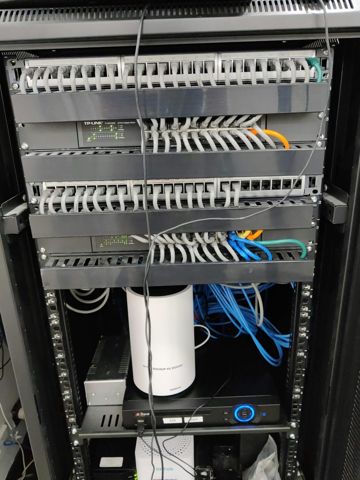
- Patch panels, comms cabinets and cable management
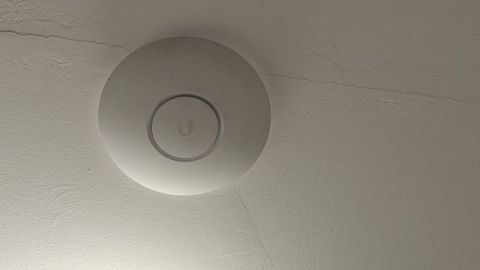
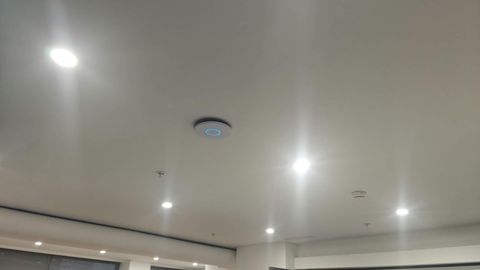
- PoE runs for ceiling access points and cameras
- Extra capacity so new desks do not mean new cable runs
- Every run tested, labelled and recorded on a port schedule
- Work staged after hours so trading is not interrupted
The part that is expensive to redo
Equipment gets replaced every few years. Cabling stays until the tenancy ends, which is why it deserves more thought than it gets. The cost of a run is mostly access, not cable, so doing it once costs far less than coming back.
The common mistake is cabling for today's floor plan. Businesses add a desk, split an office into two, move the printer or put a screen in a meeting room, and each of those becomes a separate visit if there is no spare capacity behind the wall.
Cat6, Cat6a and how many points a desk needs
Cat6 carries what most offices need today. Cat6a gives room for faster links on longer runs and for the higher power levels that some access points and cameras draw, which is why the runs to ceiling positions are often worth doing in the better cable even when the desks are not.
Two points per desk is the sensible minimum: one for the computer, one for a phone, dock or second machine. Add points for printers, meeting room screens, wall-mounted displays, the terminals at a counter, and every ceiling position where an access point will go.
Bundles matter more in an office than at home. A large bundle of cables all supplying power over Ethernet runs warmer in the middle, which affects how far it can reach, so bundle sizes and route separation from power cabling are part of the planning rather than an afterthought.
The practical limit on a copper run is 100 metres from the switch to the point, patch leads included. In a long building or across a yard that means a second cabinet linked back on fibre, which is better found on a plan than on the day.
Patch panels, cabinets and the paperwork
All runs come back to a patch panel so the fixed cabling is terminated once and never disturbed again. Everything after that is short leads between the panel and the switch, which can be changed by anybody without risking the cabling itself.
The cabinet needs room to grow, cable management between the panel and the switch, a power circuit of its own and enough ventilation to survive a hot week. It should be lockable and away from where visitors and deliveries pass.
A battery backup in it keeps the switch, the access points and the connection alive through a short outage, which in a shop is the difference between a flicker and a queue of customers who cannot pay.
The documentation is part of the job, not a favour. A port schedule mapping each panel port to a room and desk, labels at both ends of every run, and a record of what is patched where means the next fault starts from facts.
Power over Ethernet, cameras and access points
Power over Ethernet is what makes ceiling access points, cameras and desk phones practical, because none of those positions has a power point and adding one is an electrician's job. One cable does both, and the device can be restarted from the cabinet instead of from a ladder.
Switches have a total power budget as well as a per-port limit, and it is easy to plan a camera system that exceeds it. Cameras with heaters, motorised units and larger access points draw far more than a desk phone, so the budget is worked out before the switch is chosen.
Keeping cameras, access points, payment devices and staff computers on separate networks over that same cabling is a configuration decision, and far easier while the installation is new than retro-fitted across a live office.
Testing, certification and what you get at the end
Each run is tested after termination for correct wiring at both ends, length, and performance at the category the cable is being installed as. Results are provided as a report, run by run, rather than a verbal assurance that it all works.
That report is worth keeping. When a desk point fails in two years, a certified result from the day of installation instantly separates the cabling from the equipment plugged into it, which is usually the argument that wastes the most time.
You should also finish with an as-built record: where each run goes, what it is numbered, what is in the cabinet, what the switch ports are doing and where the access points are mounted. If a fitout finishes with no documentation, half of what was paid for is sitting in somebody's memory.
Scheduling, trades and what it costs
Most of the disruptive work can be done outside trading hours or over a weekend, and larger sites staged area by area so nobody loses a full day. Where a cut-over is involved, the old and new paths run together until the new one is tested.
In Australia, fixed cabling connected to the telecommunications network must be carried out by a registered cabler under the ACMA rules, and mains power work is an electrician's. We say clearly which parts of a job fall to those trades and arrange them rather than pretending every trade is ours.
Our part is the design and the network: how many points and where, capacity for growth, the cabinet layout, switching, power over Ethernet budgets, network separation, testing the result and documenting it so it can be maintained.
Cabling work is quoted per job or per visit, with materials listed separately from the labour. Ring 02 9833 1800 with the number of desks, the building type and whether a warehouse or counter is involved. We cover about 12km around Mount Druitt, Monday to Friday 8am to 7pm and Saturday 9am to 7pm.
Typical jobs
A typical job: an office splitting one large room into four, where two of the new positions have no points. We plan the extra runs back to the existing panel, use the spare ports left from the original install, and each one is labelled and tested before anybody moves in.
A typical job: a warehouse adding cameras and scanners. We plan the runs and the power budget for the switch before anything is ordered, bring in a registered cabler for the fixed cabling, and keep the cameras on a separate network from the office machines.
A typical job: a tenancy inherited with unlabelled cables spilling out of a cupboard. The runs are terminated on a patch panel and tested, the ones that go nowhere are retired, and we hand over a port schedule so the next fault takes minutes instead of an afternoon.
Questions
How many data points should each desk have?
Can this be done without shutting the office down?
Do you do the cabling yourselves?
Is Cat6a worth the extra over Cat6?
What documentation do we get?
Business data cabling: work we have done
Serving Mount Druitt and 12km around
Ready to get it sorted?
Call for a chat about what you need. Onsite and business work is quoted per job or per visit.