Local I.T. Guys Solving I.T. Problems · Mon–Fri 8–7 · Sat 9–4WhatsAppMessenger Find a Locker 02 9833 1800Book a repair
COMPwize — Local I.T. Guys Solving I.T. Problems
Repairs

Motherboard repair

When a laptop shows no signs of life, the fault is often on the main board. We diagnose it properly before you commit to anything.

What we fix

  • No power, no lights
  • Powers on but no display
  • Charging circuit faults
  • Overheating and shutdowns

Price

Motherboard repair
Board-level diagnosis and repair where the board can be saved
$274 labour
Components or a replacement board extra

Includes the $88 diagnosis. Pickup and delivery included. All prices

Signs the fault is on the board

No lights and no sound when you press the power button, even on a charger you know works, is the classic sign. Others include a charging light that goes out the moment you plug in, fans that spin with nothing on the screen, beeps or flashing keyboard lights at start-up, and USB ports or audio that stop working.

Random shutdowns and a laptop that only charges when the cable is held at a certain angle can also lead back to the board, or to the charging port soldered onto it.

On desktops, board faults show up as a PC that won't start, loses its settings, or has ports and slots that no longer work. A burnt smell or visible scorch marks near the power connectors means it should stay switched off until it's checked.

What usually causes board faults

Liquid spills are a frequent cause, sometimes weeks after the event. Faulty or poor-quality chargers, power surges and failing USB-C charging chips account for many of the others, along with shorted capacitors and firmware that has become corrupted during an update.

Heat plays a part too. Years of running hot can weaken the connections under the processor or graphics chip, and a physically damaged charging port can short parts of the power circuit when it's used.

How we diagnose it

A dead laptop isn't always a dead board. We rule out the simple things first: charger, battery, memory, display cable and charging port. Only then do we test the board itself, measuring its power rails, looking for shorted components and checking whether the firmware starts.

Depending on what we find, the fix may be replacing a single component, reflashing the firmware, replacing a separate charging board, or fitting a replacement motherboard. You get the options and a parts quote before anything goes ahead, and labour is the fixed $274, which includes the $88 diagnosis.

After the repair we run the laptop through extended stress tests, charge and discharge the battery, and test every port, the camera, audio, keyboard and Wi-Fi.

Soldered storage and your data

On MacBooks and many newer laptops the SSD is soldered to the motherboard. If the board can't be revived, the data goes with it, and a replacement board comes with its own empty storage.

If your files matter more than the laptop, tell us before we start. Getting the original board running again, even just long enough to copy your data off, may be the better plan than a new board.

Typical jobs

A typical job: a laptop with no lights and no sound on a charger we know works. We rule out the charger, battery, memory and charging port, then measure the power rails and find a shorted capacitor. It is replaced, and the laptop goes through extended stress tests before it comes back.

A typical example: a laptop that only charges when the cable is held at an angle. The charging port is soldered to the board, so we remove the worn port, fit a new one, check the charging circuit, and test charging and battery discharge. Most repairs like this are done within 72 hours.

Another typical job: a desktop that lost its settings and wouldn't start after a power surge. We test the power supply and memory first, then fit a replacement motherboard once it is quoted and approved, reinstall drivers and reactivate Windows, keeping the files on the drive intact.

When a board repair isn't worth it

Replacement boards for older or less common models can be hard to find or cost more than the laptop is worth. A failed processor or graphics chip is also rarely practical to fix.

In those cases we'll tell you, and if you're replacing the machine, we can move your files and settings across to the new one.

If the board can be repaired but the laptop is due for a battery or SSD as well, we'll point that out so you can weigh the whole picture.

Questions

Is a board repair worth it?
Sometimes it isn't. If the repair costs more than the machine is worth, we'll tell you and quote a replacement with your data moved across.
Why won't my laptop turn on even when it's plugged in?
Start with the simple checks: a different power point, a known-good charger, and whether the charging light comes on. Hold the power button for 30 seconds to reset it, then try again. If there are still no lights or sounds, the fault may be the charger, charging port, battery or motherboard, and it needs proper diagnosis to find which one.
Can a motherboard be repaired, or does it need replacing?
Many board faults can be repaired, because the failure is often one small part: a shorted capacitor, a charging chip or a damaged port. Replacing the whole board is simpler but usually costs more, and on laptops with soldered storage it means starting again with an empty drive. We'll tell you which options suit your model.
Can a desktop motherboard be replaced without losing my files?
Your files live on the drive, not the motherboard, so they normally survive a board replacement. Windows may need drivers reinstalled or reactivating on the new board, and if the drive is encrypted with BitLocker you'll need the recovery key. We back up the drive first if there's any doubt, then check everything works on the new board.
How long does a motherboard repair take?
Most repairs are done within 72 hours. Board repairs often need a specific component or a replacement board ordered in, which can add time, and we tell you if that applies when we quote. After the repair we run extended stress tests before it comes back.

Motherboard repair: work in the workshop
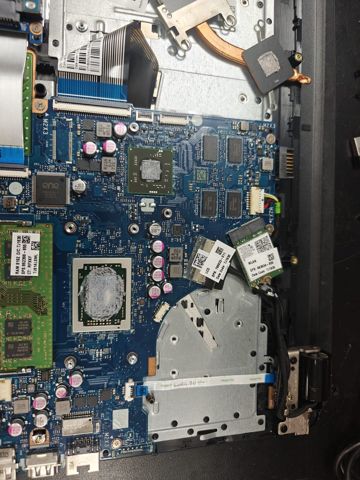
Laptop motherboard with fresh thermal paste applied to the processor
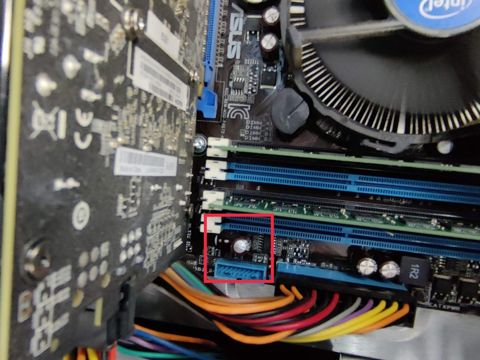
Diagnosing a desktop motherboard, with the front panel header highlighted
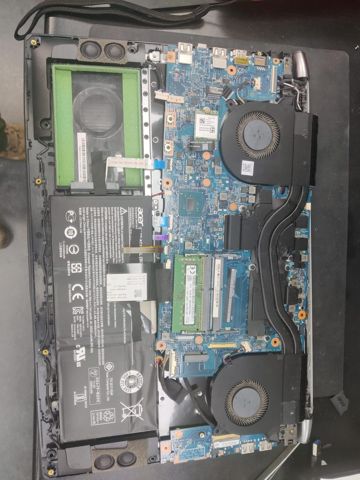
Acer laptop opened on the bench with the battery and cooling fans exposed
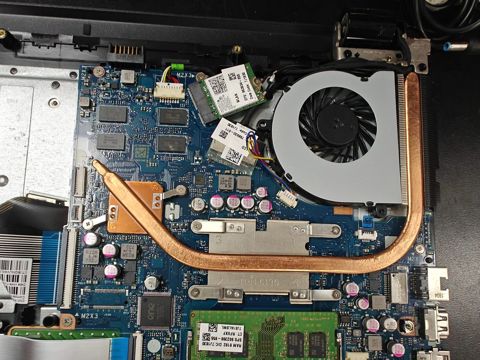
Laptop cooling system with the copper heatpipe and fan refitted

Ready to get it fixed?

Book online in two minutes or call us. $274 fixed labour, diagnosis included.

Rated Excellent on Google
230+ reviews from local customers
Awesome service, issues sorted quickly. I will be back in future for any PC requirements. I have been dealing with these guys for years now and will continue to do so.
Richard Clarkson · April 2026
Super nice and reliable, without them feeling like they're trying to rip ya money.
Kaili Tarawa · February 2026
Recently got my laptop repaired from COMPwize and it was done relatively fast and cost repair was good as compared to other computer repair stores.
Nicholas Tumangday · November 2025
Greatest service from AJ and Michael, thank you so much for installing the hard drive and cleaning the PC up. Best service ever!
Azad Aghdar · November 2025
Absolute fantastic place to get your PC repaired here. Michael shows he really cares for his customers, very friendly and professional. The diagnostic and repair process report is very informative and helpful as well.
Michael Tang · October 2025
A true gentleman to deal with. I needed a part for my PC, he didn't even charge me for the part. Thank you.
John · October 2025
Michael is a magnificent IT professional. He will be honest with you from the beginning, and will save you time and money if he can. His prices are very good.
Leah Barrie · October 2025
Thank you so much AJ for your help, my computer is running smooth now, no more overheating. Great advice and service, 10/10.
Jay Jay · November 2025

Our service area

We cover about 12km around Mount Druitt for pickup and delivery, deposits and onsite work: Mount Druitt, Rooty Hill, St Marys, Minchinbury, Plumpton, Oakhurst, Glendenning, Colyton, Doonside, Blacktown, Quakers Hill, St Clair, Erskine Park, Werrington, Kingswood, Penrith, Marayong, Seven Hills, Prospect, Stanhope Gardens, Lethbridge Park, Ropes Crossing, Marsden Park, Schofields, Cambridge Park, Glenmore Park, Kemps Creek and the suburbs in between.

NSEW Rooty HillPlumptonOakhurstMinchinburyColytonGlendenningLethbridge ParkSt MarysDoonsideRopes CrossingQuakers HillSt ClairErskine ParkMarayongStanhope GardensBlacktownWerringtonMarsden ParkProspectSchofieldsCambridge ParkKingswoodSeven HillsPenrithKemps CreekGlenmore Park Mount Druitt12km radius
Mount Druitt12km radius
  • NOakhurst, Marsden Park
  • NEPlumpton, Glendenning, Quakers Hill, Stanhope Gardens, Schofields
  • ERooty Hill, Doonside, Marayong, Blacktown, Seven Hills
  • SEMinchinbury, Prospect
  • SErskine Park, Kemps Creek
  • SWColyton, St Clair
  • WSt Marys, Werrington, Cambridge Park, Kingswood, Penrith, Glenmore Park
  • NWLethbridge Park, Ropes Crossing

Approximate positions and distances from Mount Druitt.

Call WhatsAppBook