
Business Wi-Fi installation and coverage
Office Wi-Fi fails in ways a home never notices: thirty devices on one radio, a payment terminal that drops mid-sale, and staff who cannot work in half the building. We survey the site, then design coverage and capacity around how the place is actually used.
What we do
- Black spots in back offices, store rooms and warehouses
- Ceiling-mounted access points and PoE switches
- Separate staff, guest and payment networks
- EFTPOS and point-of-sale terminals that keep dropping
- Coverage across yards, outdoor areas and between buildings
- Wi-Fi that slows down when everyone is on site
Where business Wi-Fi falls over
Most small offices run on the modem the provider posted out, sitting in reception because that is where the line came in. It was built for a household, and it now carries laptops, phones, a printer, cameras, a terminal and whatever visitors connect.
The symptoms are predictable. Staff at the far end of the floor lose the shared drive, a stocktake scanner stops halfway down an aisle, a video call breaks up in the meeting room, and the terminal at the counter times out with a customer standing there.
The cost is not the Wi-Fi, it is the time. Every drop-out is somebody stopping, retrying, and eventually ringing you. A site with fifteen staff losing a few minutes each a day is losing more than the equipment is worth.
Access points on the ceiling, powered over the cable
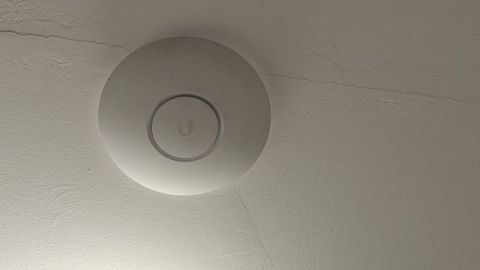
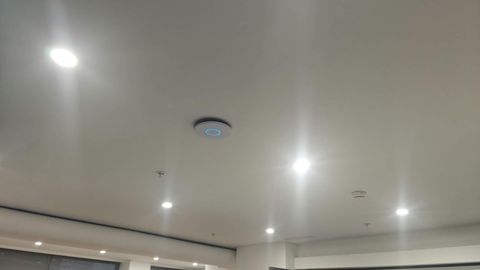
Business coverage is built from several access points placed for the shape of the building, rather than one device turned up loud. Mounted on the ceiling, they radiate down into the space instead of sideways through filing cabinets and partitions, and they stay out of reach of anyone who might unplug one.
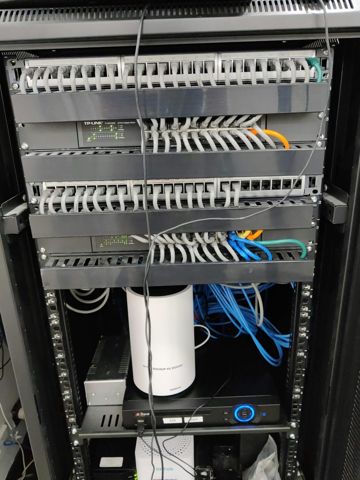
Power over Ethernet carries data and power down the same cable, so no power point is needed above a ceiling tile. A PoE switch in the comms cabinet powers the lot, and a battery backup on it keeps the access points and the terminal alive through a short outage.
Access points that are centrally managed matter more than their brand. One place to change a password, push firmware, see which units are busy and see which are down beats logging into devices one at a time, and it is the difference between noticing a problem and hearing about it from staff.
Warehouses, yards and outdoor areas
A warehouse is a different problem from an office. Racking full of stock absorbs signal, steel shelving and roller doors reflect it, and coverage measured in an empty building disappears once it is full. Aisles need covering along their length, which means more units than a floor plan suggests.
Cool rooms, plant rooms and metal-clad sheds often need their own point rather than an optimistic reach from inside. Outdoor areas, loading docks and yards need equipment rated for weather and mounted where it can actually see the area being used.
Where a second building or a demountable sits across a yard, a wireless link between them is usually cheaper than trenching, and a cable in conduit is more reliable if a trench already exists. We will tell you which one the site suits, and what each depends on.
Staff, guest and payment networks
One network for everything is convenient until someone's visitor, or a compromised device, is sitting alongside your accounts machine. Separate network names, kept apart from each other, cost nothing extra when they are set up at the start.
Guests go on a network that can reach the internet and nothing else, with its own password and, where it matters, a limit so a visitor streaming does not slow the counter. Changing that password takes seconds rather than an afternoon of rejoining printers.
Payment terminals, point-of-sale and cameras belong on their own network as well. Keeping the terminal away from general staff traffic is the single most effective way to stop the mid-transaction drop-outs that everybody blames on the bank.
When a staff member leaves, a shared Wi-Fi password walks out with them. Separating the networks limits what that actually exposes, and is part of what an auditor or an insurer will ask about.
Capacity, roaming and staying up
Coverage and capacity are different things. A bar of signal in every room says nothing about what happens when forty devices are awake at once, because they take turns on the air. Fixing a busy site usually means more access points each covering a smaller area, not a bigger aerial on one.
Roaming is what lets someone walk the floor on a tablet, or carry a call into the meeting room, without the connection stalling. It depends on the access points sharing settings and on the cells overlapping by the right amount, which is configuration rather than hardware.
Anything that does not move should be on a cable: desktops, the multifunction, the terminal at the counter. That is not only better for those devices, it frees the air for the laptops and handhelds that have no choice.
Survey, install and what it costs
We start by walking the site with a meter and a floor plan, noting construction, where people work, what the stock does to the signal, and which neighbouring networks are competing. The design that comes out of that names where each access point goes and why.
Installation is scheduled around trading. Most of the work can be staged after hours or across a weekend so the counter never stops, and the runs, labelling and cabinet layout are documented. We hand over the network names, the passwords and a port list at the end.
Business work is quoted per job or per visit, with hardware listed separately so you can see both. Where fixed cabling is involved we will tell you when a registered cabler or an electrician is required rather than pretending every trade is ours.
We cover about 12km around Mount Druitt, Monday to Friday 8am to 7pm and Saturday 9am to 7pm. Ring 02 9833 1800 with the rough size of the site and what keeps dropping, and we will work out what a survey involves.
Typical jobs
A typical job: a shop where the terminal at the counter times out during busy periods. The survey finds the counter at the edge of one overloaded router's range, so we fit cabled access points, put payments on their own network, and the counter stops dropping.
A typical job: a warehouse where handheld scanners work at the front and not down the aisles. We measure with the racking full, mount points along the aisles on PoE, and add an outdoor-rated unit covering the loading dock.
A typical job: an office where video calls break up whenever the floor is full. We replace a single consumer router with several managed access points, move desktops and the multifunction onto cable, and split staff and guest traffic so visitors cannot slow the work network.
Questions
How many access points does an office need?
Why does the EFTPOS terminal keep dropping out?
Can you get Wi-Fi into the warehouse and the yard?
Will installation shut us down for a day?
What does business Wi-Fi cost?
Business Wi-Fi installation: work we have done
Serving Mount Druitt and 12km around
Ready to get it sorted?
Call for a chat about what you need. Onsite and business work is quoted per job or per visit.