
Wi-Fi installation and Wi-Fi fixes for your home
Most homes do not need a faster internet plan, they need Wi-Fi that reaches the rooms people actually use. We measure what the signal is doing through your house, then fix the cause rather than adding another box to the pile.
What we fix
- Dead spots in back bedrooms, upstairs rooms and granny flats
- Wi-Fi that drops out during video calls and streaming
- Slow speeds a long way from the modem
- Mesh systems and cabled access points placed properly
- Channel congestion in units and townhouse complexes
- Guest networks, and smart home devices that will not connect
What bad Wi-Fi in a house looks like
The complaint is rarely that the internet is down. It is that a video call freezes in the back bedroom, the TV buffers the moment somebody starts a game, or a tablet works in the lounge and not in the kitchen.
Those patterns are worth paying attention to, because each points somewhere different. Trouble that follows a room is coverage. Trouble that follows one device is that device, or the band it has attached itself to. Trouble that arrives at seven every night is congestion, either inside the house or across the street.
Working from home raised the bar as well. Two seconds of buffering while streaming is nothing; the same two seconds in a meeting is a problem. The spare room that became an office is very often the furthest point in the house from where the equipment was installed.
Why the signal stops where it does
Wi-Fi does not spread through an Australian house evenly. Double brick, rendered walls with wire mesh behind the render, and the original external wall now buried inside an extension all take a hard bite out of the signal.
Foil-backed insulation and foil sarking under a tiled roof are worse again, because foil bounces the signal back instead of letting part of it through. That is why an upstairs room directly above the router can be weaker than a room on the same level much further away.
Concrete slabs between storeys, tiled bathrooms, mirrored wardrobe doors, the fridge and a metal garage door all count, and a studio out the back usually sits behind two or three of them at once. None of this shows up in a speed test taken next to the router.
Where the modem sits, and what can be done about it
The modem normally ends up wherever the connection happens to arrive: the garage, the laundry, or the front corner of the house near the old phone socket. That position was chosen by the cabling, not by anyone thinking about where the family uses the internet.
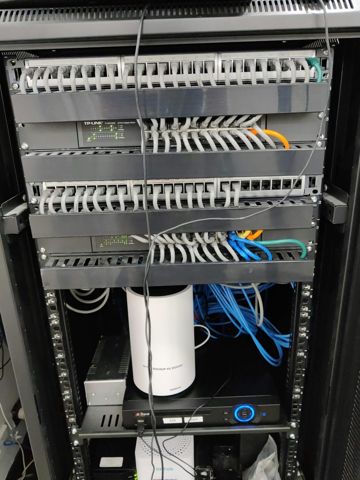
When the position itself is the fault, there are two useful answers: shift the connection point, or run a cable to a better spot and start the Wi-Fi from there. One cable into the middle of the house frequently achieves more than any amount of new hardware bought on a guess.
Mesh, access points and extenders
A plug-in extender repeats whatever it can hear. Put it where reception is already poor and it repeats a poor signal, and because it talks to the router and to your phone with the same radio, throughput roughly halves. Extenders have their uses, but they are why a lot of people have decided Wi-Fi simply cannot be fixed.
A mesh system uses matched units sharing one network name, so phones and laptops hand over between them without anyone touching a setting. Mesh suits houses where cable cannot practically be run, and the units have to sit within strong range of each other rather than being scattered into the far corners.
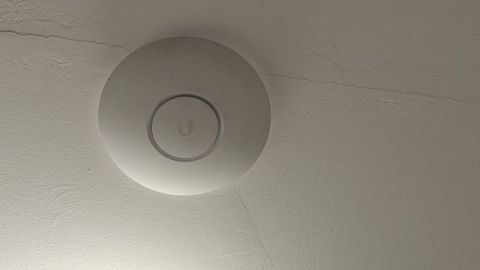
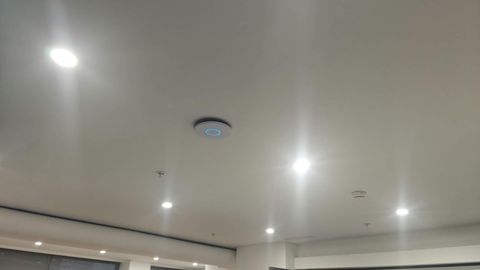
Access points are the same idea with a cable behind them. Each one runs at full speed because the link back to the modem is not being taken out of the wireless, and coverage becomes predictable instead of hopeful. Where a cable can be run, a cabled access point beats a wireless mesh unit every time.
Which of the three suits your place depends on the building, not on the brand, and we will say when the cheapest option is the right one.
Congestion, bands and a network for guests
In unit blocks, townhouse complexes and on narrow blocks, your Wi-Fi shares the air with every neighbour. The 2.4GHz band has only three channels that do not overlap each other, so in a block of units it is usually full by the evening.
The 5GHz band has far more room but less reach through walls, and 6GHz on newer gear has more again with less reach still. A setup worth having uses the bands on purpose: the quick bands for phones, laptops and TVs, and 2.4GHz kept clear for smart plugs and cameras.
Picking a clean channel, setting channel widths sensibly and letting devices move off a band they are clinging to are all settings, not purchases. So is a guest network, which keeps visitors and smart gear away from the computers that hold your files, and lets you change the visitor password without rejoining the whole house.
The site survey, and what it costs
We begin with a wired test at the connection, so the Wi-Fi does not get blamed for something that arrived broken from outside. Then we walk the house with a meter, room by room, covering the rooms people complain about and the ones nobody mentions.
That gives us signal levels where devices are really used, the competing networks and the channels they sit on, and the walls the signal is dying in. You get a plan with the reasons attached, before any money is spent.
Settings work, such as channels, bands, a guest network or a device that refuses to join, can often be done over remote support at $179 per hour with a one-hour minimum. Anything to do with coverage, placement, cabling or new equipment needs us in the house, and that is quoted per job.
We cover about 12km around Mount Druitt, Monday to Friday 8am to 7pm and Saturday 9am to 7pm. Ring 02 9833 1800, tell us which rooms are bad and when, and we will quote before coming out.
Typical jobs
A typical job: a two-storey house where the upstairs home office drops video calls while the lounge below is fine. The survey shows foil sarking cutting the signal between floors, so we run one cable upstairs and fit an access point, and the office sits on full strength.
A typical job: a studio out the back with no usable signal across the yard. We measure what reaches it, fit a cabled point rather than a repeater so the speed is not halved, and put both the house and the studio on one network name.
A typical job: a family home where streaming and gaming slow everything down at once. We move the TV and console onto cable, split the bands so phones stop sitting on 2.4GHz, put the smart home gear on a guest network, and leave the fast band free for work calls.
Questions
Why is the Wi-Fi fine in the lounge and useless in the back bedroom?
Should I buy a mesh kit or a better router?
Can this be fixed without buying anything?
Does someone have to come to the house?
Why does it only go bad in the evening?
Wi-Fi installation: work in the workshop
Serving Mount Druitt and 12km around
Ready to get it fixed?
Book online in two minutes or call us. $274 fixed labour, diagnosis included.