
Slow computer
Slow is a symptom, not a fault. It might be a drive on the way out, too little memory for the way you work, heat, or years of software piling up, and the fix and the cost are different for each.
What we fix
- Start-ups that take minutes instead of seconds
- Freezing, stalling and the spinning cursor
- Browsers that crawl with a few tabs open
- Programs that take an age to open
- Computers that get slower as they warm up
- Drives that have filled up or are failing
Which kind of slow is it
It helps us to know exactly when it drags. A long start-up but reasonable speed afterwards points somewhere different from a machine that is fine for an hour and then crawls, and different again from one that only stutters in a browser.
Freezing for several seconds at a time, with the mouse still moving, usually means the computer is waiting on storage. Everything slowing down together as the session goes on usually means memory pressure or heat.
Tell us what changed and when. A machine that has been getting gradually worse over two years is a different problem from one that became slow the week an update installed or a new program went on.
What is usually behind it
Mechanical hard drives are the single biggest cause on older machines, and a drive with developing bad sectors is worse again, because every read it retries stalls whatever you are doing. SSDs can also slow down badly when they are nearly full or worn.
After that comes memory. Modern browsers, video calls and office software use far more than machines were sold with a few years ago, and once the computer runs out it starts swapping to the drive, which is why a shortage of memory feels like a slow disk.
Then the software layer: programs loading at start-up, two security products fighting each other, cloud sync running constantly, browser extensions, a stack of failed updates, and a drive with almost no free space left for Windows to work in.
What we measure
We time a cold start and watch what the machine is waiting on while it happens. We read the drive's health data, including reallocated sectors and, on an SSD, how much of its write life is used, because a drive can be failing long before it produces an error.
We check how much memory is in use at rest and under your normal workload, watch temperatures under load to see whether the processor is throttling itself, and read the event logs for repeated errors and failed updates.
We also check the machine against what it is being asked to run. That means the processor generation, whether the system is fully updated, and how much free space the drive has. Those four numbers usually explain most of it.
What a tune-up will and will not do
Clearing start-up programs, removing what is not needed, fixing broken updates and tidying browser extensions can make a healthy machine feel much better, and that work often needs no parts at all.
It will not make an ageing processor faster, and it will not rescue a drive that is failing. We would rather tell you that after the diagnosis than take the money and hand back something that feels the same in a fortnight.
Where the answer is a part, it is usually an SSD, more memory, or both, and we quote the part before ordering. Where the answer is that the machine has reached the end of its useful life, we will say so and help you plan a replacement with your data moved across.
Getting it looked at, and what to try first
Restart properly rather than closing the lid, and leave it a few minutes to settle, because a machine that has not restarted in weeks is often waiting on updates. Check how much free space the drive has and clear the downloads folder. Uninstall anything you know you do not use.
If the computer still works and connects, this is one of the jobs that suits remote support at $179 per hour, with nothing collected and nothing leaving your home. If it needs hardware work, pickup and delivery is $50.
Labour on a repair is the fixed $274, which includes the $88 diagnosis, and most jobs are done within 72 hours. If you decide not to proceed once you know what is wrong, you pay only the $88.
Typical jobs
A typical job: a home laptop that takes minutes to reach the desktop and stalls when opening anything. The drive health shows reallocated sectors climbing, so we quote an SSD, move the system and files across, and confirm the start-up time before and after.
A typical example: an office PC that slows to a crawl by mid-morning. We find memory fully committed under a normal workload of browser tabs and spreadsheets, check what the board supports, fit matching memory and run a full memory test before returning it.
Another typical job: a computer that became slow after an update failed repeatedly. Handled over remote support, we clear the failed update, remove software the owner no longer uses, tidy the start-up list, free up space on a nearly full drive and confirm updates now install cleanly.
Questions
Why is my computer so slow all of a sudden?
Will adding memory fix a slow computer?
Can you speed up my computer remotely?
Is it worth fixing a slow old computer or should I replace it?
Does a slow computer mean a virus?
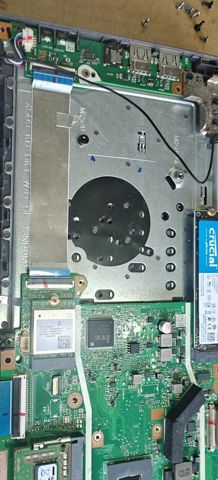
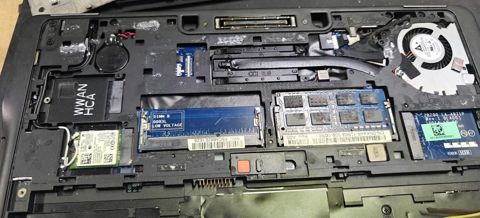
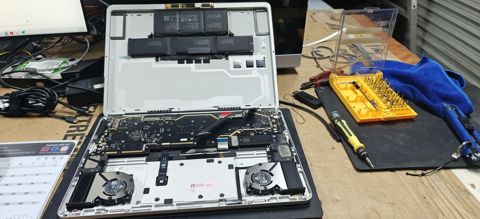
Slow computer: work in the workshop
Serving Mount Druitt and 12km around
Ready to get it fixed?
Book online in two minutes or call us. $274 fixed labour, diagnosis included.