
New office IT setup
An empty office is easier to get right than an occupied one, as long as the work happens in the right order. The expensive mistakes are the ones that cannot be undone once the ceilings are closed and the desks are in.
What we do
- Checking what internet is available before you sign
- Data cabling, patch panel and a tidy comms cabinet
- Wi-Fi that covers the whole floor, with a guest network
- Workstations, monitors and printers set up and tested
- Phones, shared files and Microsoft 365 from day one
- Security, backups and a working first morning
Start before you sign the lease
The first question about a new office is not where the desks go, it is what internet you can actually get at that address. Two units in the same street can have completely different options, and the wrong answer can take weeks to work around after you have committed to the space.
So we check the address early: what is available at the building, whether the connection is fibre to the premises or something older, what the realistic upload speed is, and how long an install takes. If the office is small or the timing is tight, a business 5G or 4G service can carry the business until a fixed connection lands, or serve as the backup line afterwards.
Ask about a static address if you will be running a payment terminal, a camera system or remote access into the office. It is much easier to order at the start than to change later. If you are moving an existing office rather than starting one, our office relocations page is the better place to begin.
Cabling and the comms cabinet
Data cabling is the one thing that is painful to add later, because it means ceilings, walls and a trade coming back. Before it goes in, the floor plan needs to be settled: where the desks sit, where printers live, where access points go on the ceiling, and where the cabinet lives.
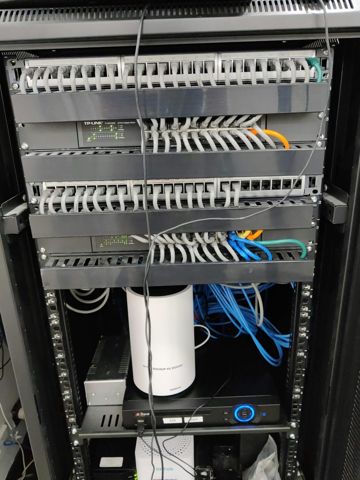
Run more cables than you think you need while the walls are open, because the cost is in the access rather than the cable. Two points per desk is the usual minimum, with extras for printers, screens and anything wall-mounted. Every run gets labelled at both ends and terminated on a patch panel, so the next person can work out what goes where without a torch and guesswork.
The cabinet itself needs a power circuit, some ventilation and a location that is not the hottest cupboard in the building. Wall-mounted is fine for a small office. It also needs to be somewhere a visitor cannot casually reach, because a network cabinet in reception is a security problem as much as a tidiness one.
Wi-Fi that covers the whole floor
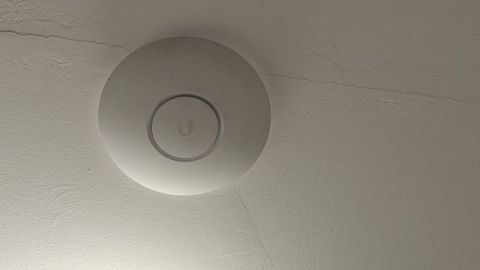
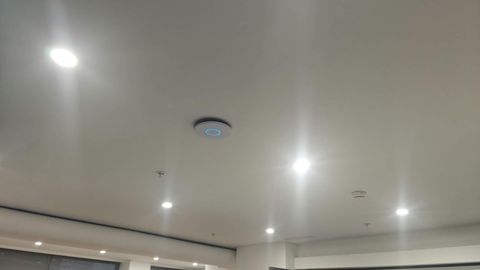
One router in the corner does not cover an office. Modern fit-outs use ceiling-mounted access points cabled back to the cabinet, placed for the shape of the floor rather than for convenience. Plasterboard is forgiving, concrete, brick, glass partitions and lift shafts are not.
Anything that does not move should be on a cable: desktops, printers, payment terminals and the point-of-sale. Wi-Fi is for laptops, phones and tablets, and it behaves far better when the fixed equipment is off it.
Guest Wi-Fi goes on a separate network that cannot reach your office machines, with its own password that you can change without touching the staff network. It is a small piece of setup that saves a lot of trouble.
Workstations, printers and phones
Standardising machines pays off immediately. The same model across the office means one set of drivers, one spare power supply, parts that swap between machines, and a build you can repeat for a new starter in an afternoon. Business-range machines with an onsite warranty cost more up front and cost far less across three years.
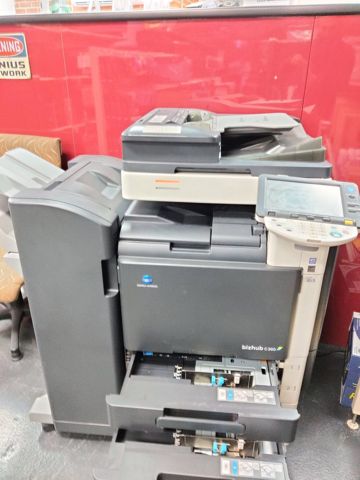
One printer model is the same idea. A multifunction on the network with scan-to-email or scan-to-folder does more for a small office than three cheap desktop printers, and the scanner needs to be set up correctly so its mail is not treated as forged.
Phones are worth deciding early, because porting existing numbers takes time and is the step that most often runs late. Internet-based phones run over the same cabling and work from anywhere, which suits businesses with staff out on jobs. Some small businesses skip desk phones entirely and run on mobiles with a diverted main number, and that is a legitimate answer.
Files, accounts and whether you need a server
Set up the Microsoft 365 tenant, the domain and the mailboxes before the fit-out finishes, because everything else hangs off them. Decide the email naming convention once, set up shared mailboxes for the addresses the business publishes, and create an administrator account that is not somebody's day-to-day login.
For shared files, most new offices do not need a server. SharePoint and OneDrive handle documents, work from anywhere, and remove a box that would need replacing in five years. A server or NAS earns its place when an application demands one, or when the files are large enough that working on them over the internet is slow.
Whichever you choose, set the folder structure and the access groups at the start while there is nothing in there. Permissions are easy on day one and become a project once four years of files have accumulated. Our servers and shared storage page goes through the decision in more detail.
Security, backups and a rough order of events
Before anyone starts work: multi-factor sign-in on every account, a proper firewall rather than the modem the provider supplied, separate staff and guest networks, and backups configured and tested, including the 365 data. Doing this at the start costs a fraction of retro-fitting it later.
The order that works, roughly, is this. Check internet availability before signing, then settle the floor plan so desk and printer positions are fixed.
Next, order the internet service and start any phone number porting, because those have the longest lead times and nothing else waits on you. Then get cabling in during the fit-out, before the ceilings close, followed by power and the cabinet, then the network gear and access points.
Then the software and hardware side: set up 365, the domain and mailboxes; build and test the workstations; install printers and phones; turn on backups and security. Finish by testing everything with real tasks a few days before anyone moves in, printing, scanning, calling, saving a file, signing in from a phone.
We stay reachable through the first week, because that is when the small things surface. Fit-out work is quoted per job, and we will tell you what needs a cabler or an electrician rather than pretending every trade is ours.
Typical jobs
A typical job: a business taking its first real office after years of working from home. We check what internet is available before the lease is signed, get the cabling in during the fit-out, set up 365 with shared mailboxes, and have eight desks printing, scanning and signing in on the Monday morning.
A typical job: a second site for a business that already has one office. We match the setup at the existing site so the same machines, same printer model and same shared folders apply, and link the new site to the same 365 tenant so staff can move between them.
A typical job: a small suite where the fit-out is finished but nobody ordered data cabling and the Wi-Fi does not reach the back room. We add cabling to the desks that need it, replace the single router with cabled access points, and put guest Wi-Fi on its own network.
Questions
How early should we get you involved?
Do we need cabling, or is Wi-Fi enough?
Can you supply the computers and network gear?
How long does a small office fit-out take?
What does it cost?
New office IT setup: work we have done
Serving Mount Druitt and 12km around
Ready to get it sorted?
Call for a chat about what you need. Onsite and business work is quoted per job or per visit.