
Business NBN installation and connection help
We are not an NBN provider and we do not sell plans or take commissions. We handle everything around the connection: checking what an address can get before you sign, the wiring from the box to the cabinet, and a backup line so a single outage does not stop trading.
What we do
- Checking what is available at an address before you commit
- The NBN box, the comms cabinet and the wiring between them
- Router and firewall setup on a new business connection
- Poor or unstable lines investigated with evidence for your provider
- 4G or 5G backup that takes over when the main line drops
- Connecting a new site, or moving one without losing days
Check the address before you commit to it
What a business can get at one address says nothing about the unit next door. Two tenancies in the same complex can sit on different technology, and finding that out after signing a lease is an expensive way to learn it.
Upload speed is usually what hurts, not download. Cloud accounting, hosted phones, video meetings, remote access and offsite backups all push data outwards, and a connection type with a thin upload will feel slow no matter how large the download figure looks in the advertisement.
Lead time matters as much as capability. A connection at an address that already has one can take days; a site that has never been connected can run into weeks, and that is outside anyone's control. It should set the order everything else is booked in.
Connection types and what they mean for a business
Fibre to the premises brings fibre into the building and is the most predictable for a business, particularly where upload matters. Fibre to the curb and fibre to the node both finish on copper, so distance and the condition of that copper decide the result.
Cable connections reuse the pay TV network and can be shared with everything around them, which shows up at the busiest part of the day. Fixed wireless connects by aerial to a tower and depends on line of sight, so a new building going up nearby can change it.
Some addresses can be upgraded to a better technology on request, and some business-grade services come with a stated fault response time rather than a best-effort one. Both are ordered through a provider, and both are worth asking about. We have nothing to gain from the answer.
Where the equipment goes on a commercial site
In an office the connection should finish in the comms cabinet, not on a reception counter where anyone can knock it. The network box, the router or firewall and the switch live together, on their own power circuit with room for a battery backup.
Where the lead-in arrives in a riser cupboard or a loading dock, a cable is run from there to the cabinet rather than leaving the equipment in an awkward spot. In a multi-tenancy building, check which riser your service lands in before assuming the shortest route is available.
The router the provider posts out is a starting point, not a business firewall. If staff work remotely, or a camera system needs to be reachable, the connection deserves proper equipment and a fixed address worth asking your provider for.
When the connection is not performing
An office that slows every afternoon, a phone system with words dropping out, or a connection that resets at the same hour each day are all worth measuring before anyone changes plans. We test on a cable at the connection and record what it does across the day.
On a copper-fed service the internal wiring is a common culprit. Sockets scattered through a tenancy from previous fitouts, a splitter left in a cupboard and unused runs still connected all drag the line down, and reducing it to one clean path is often the whole fix.
Faults past the boundary belong to your provider, and the only thing that moves them is evidence. Sync figures, drop-out times and a record showing the fault survives with the internal wiring simplified give them something to escalate instead of another call saying it feels slow.
If the line is as good as it will get, that is worth knowing too. At that point the practical answers are a different technology, a second service, or a failover connection rather than more phone calls.
Backup connections and staying open
For most small businesses, the cost of an internet outage is measured in whether customers can pay. If the terminal, the phones and the cloud software all run over one connection, that connection is a single point of failure that will eventually be tested.
A router that can hold a mobile broadband service as a second path switches over on its own when the main line fails, usually inside a minute. Terminals and phones keep working, cloud software keeps working, and large transfers are best left until the main line returns.
A backup that has never been tested is not a backup. We switch it over deliberately once it is in, confirm the phones and the terminal survive, and note what does not. The mobile service also needs enough data allowance to carry a real day.
New sites, moves and what it costs
Order the connection at a new site before anything else in the fitout, because it has the longest and least controllable lead time. Where the dates allow, run the old and new services in parallel over a move and cut over once the new one is tested.
Plan the cabinet equipment, the wiring from the box to it, the firewall and the failover service as one piece of work rather than four separate calls. Once it is live we document the account details, the equipment and how the failover behaves.
Business work is quoted per job or per visit, with hardware listed separately. Where fixed cabling is needed, we will tell you when a registered cabler or an electrician has to do that part rather than pretending every trade is ours.
We cover about 12km around Mount Druitt, Monday to Friday 8am to 7pm and Saturday 9am to 7pm. Ring 02 9833 1800 with the address and what the site has to run, and we will work through the options with you.
Typical jobs
A typical job: a business looking at two tenancies in the same complex. We check what each address can be connected with and how long each would take, and the difference in upload speed decides which unit they take before the lease is signed.
A typical job: an office where the phone system breaks up every afternoon. We test the line on a cable through the day, find old wiring from a previous tenant still connected, simplify it to one path and hand the remaining figures to the provider.
A typical job: a shop that lost a trading day to an outage. We fit a router with a mobile backup service, test the changeover with the terminal and phones running, and document what keeps working when the main line goes down.
Questions
Do you sell business internet plans?
How long before a new office is connected?
Is a backup connection worth the monthly cost?
Our connection is slow but the provider says it is fine. What now?
Can you handle a move between sites?
Business NBN installation: work we have done
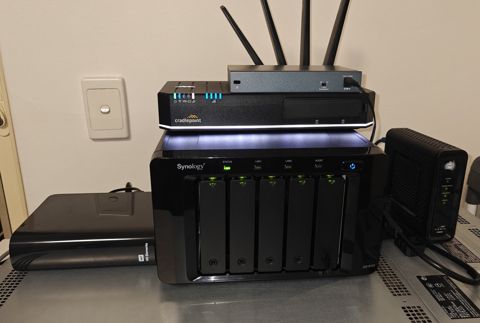
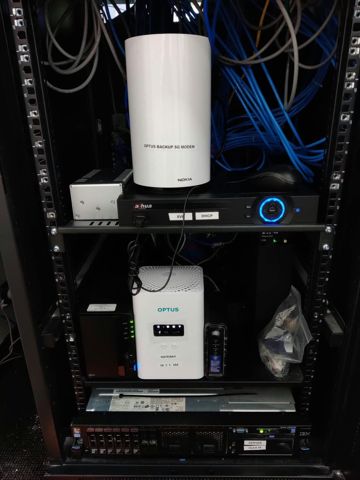
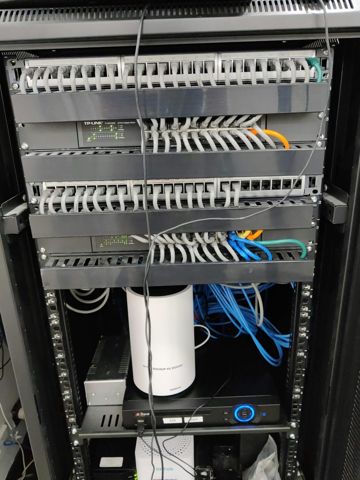
Serving Mount Druitt and 12km around
Ready to get it sorted?
Call for a chat about what you need. Onsite and business work is quoted per job or per visit.