
Hard drive and SSD replacement
A drive on the way out gives you warnings before it goes: stalls, errors, a start-up that takes forever, sometimes a noise. Acting on those is the difference between a parts job and a data recovery job.
What we fix
- Drives that click, grind or spin up and down
- No bootable device and missing operating system errors
- Drives reporting SMART or health warnings
- SSDs that have worn out or dropped offline
- Failed drives in laptops, desktops and all-in-ones
- Replacement drives fitted and data moved across
Signs a drive is on the way out
The clearest warning is a machine that hangs for long stretches while the drive light stays on, then carries on as if nothing happened. Files that will not open, folders that vanish and reappear, and repeated repair prompts at start-up point the same way.
Errors like no bootable device, operating system not found, or a request to insert boot media mean the machine cannot find a working drive at all. That is sometimes a setting or a loose cable, but far more often it is the drive.
Noises only come from mechanical hard drives. Clicking in a repeating pattern, grinding, or a drive spinning up and down over and over means the mechanism itself is struggling. Switch that machine off and leave it off.
Hard drives and SSDs fail differently
A mechanical drive usually declines over weeks. Sectors go bad, the drive retries them, and the machine stalls while it waits. That slow decline is useful, because it gives us a window to copy everything off while most of the drive is still readable.
SSDs tend to be fine and then not. They can drop out mid-session, appear as unformatted, or shrink to a read-only state once their write life is used up. Firmware faults can also take one offline with no warning at all.
Both report health data we can read, and that is what we check before anything else. Reallocated and pending sectors on a hard drive, and used write life and error counts on an SSD, usually tell us how much time we are working with.
What we check before replacing anything
Not every one of these symptoms is a drive. A loose or failing cable, a dying power supply, a failed update, or memory faults all produce similar behaviour, so we test those before condemning a drive that may be fine.
Where the drive really is failing, how we handle it depends on its condition. A drive that is only lightly affected can be cloned directly. One that is struggling gets imaged sector by sector onto a healthy drive first, so we are not asking a dying drive to work harder than it has to.
If a drive is clicking, or if an image cannot be completed, this becomes a data recovery job rather than a replacement, and we tell you that before going any further so you can decide what the files are worth.
Moving your data across
Where the old drive can be read, we move everything: the operating system, your programs, settings and files, so the machine starts up looking the way you left it. Where it cannot, we install fresh and restore your data from the image or your backup.
Encrypted drives need your key or password before we start. BitLocker or Windows device encryption keys normally sit in your Microsoft account, and a Mac with FileVault needs your login password. Without them, a perfectly healthy drive is unreadable.
Your old drive comes back to you unless you want it disposed of, in which case we wipe it first. Keeping it for a few weeks is worth doing, as a second copy of everything until you are sure nothing is missing.
Choosing the replacement, and the cost
We check what your machine physically takes before quoting: the connector, the form factor, and whether an M.2 slot supports NVMe, SATA or both. Older machines sometimes cap the size or speed they can use, and there is no point buying past that limit.
Labour is the fixed $274 on any repair, including the $88 diagnosis, and the drive is quoted and approved before we order. Most jobs are done within 72 hours, with extra time only where a drive has to be ordered or a failing drive images slowly.
New drives carry a 12-month warranty and workmanship is covered for 90 days. We also set up a backup before the machine goes back, because the next drive will fail eventually too, and a backup turns that into an inconvenience.
Typical jobs
A typical job: a laptop hanging for a minute at a time with the drive light steady. Health data shows pending sectors, so we image the drive onto a healthy one while it can still be read, fit an SSD, and confirm the machine starts normally.
A typical example: a desktop showing no bootable device after a power cut. We rule out the cable and firmware settings, confirm the drive has failed, quote a replacement, and restore the data from the customer's backup once the new drive is in.
Another typical job: an SSD that vanished mid-session and now shows as unformatted. We check whether it responds to a firmware update, recover what can be read onto a working drive, and replace it, then set up a backup before it goes back.
Questions
How do I know if my hard drive is failing?
Can you replace a drive without losing my programs?
Should I replace a hard drive with an SSD?
What does no bootable device mean?
Do SSDs fail too?
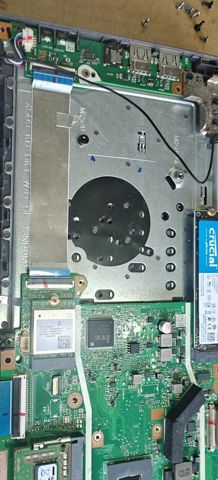
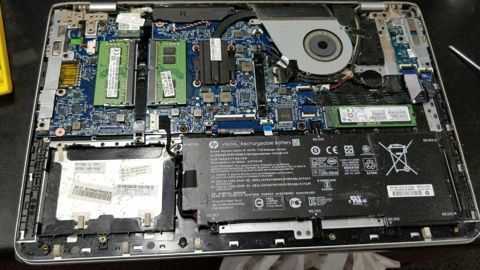
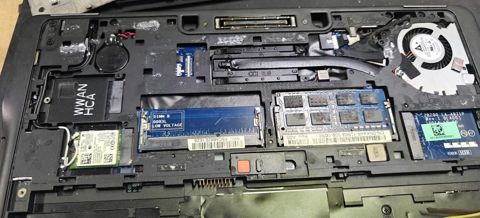
Hard drive and SSD replacement: work in the workshop
Serving Mount Druitt and 12km around
Ready to get it fixed?
Book online in two minutes or call us. $274 fixed labour, diagnosis included.