
Insurance reports for damaged computers
If a computer has been dropped, spilled on, surged, stolen or damaged in a fire, your insurer or employer will usually want a written assessment from a repairer. We inspect the device and give you a clear report of what we found and what it would take to fix or replace it.
What we fix
- Written damage and condition reports
- Repair quotes with parts itemised
- Replacement quotes where repair is not viable
- Drop, impact and cracked screen damage
- Liquid spill and corrosion assessments
- Power surge, storm and fire damage
What the report covers
We record what the device is, including make, model and serial number, and its condition as we receive it. Then what we found on inspection: the specific damage, what has failed because of it, and whether the damage is consistent with the event you described.
From there the report sets out what repair would involve, with parts listed, or states that the device is not economically repairable and what an equivalent replacement would be. Photographs of the damage are included.
It is a technical assessment, written plainly, and it is yours. What we report is what we found, and we do not adjust findings to suit an outcome.
What we do not do
We are a repairer, not an insurer or a broker. We cannot tell you whether a claim will be accepted, what your policy covers, or how to word a claim, and we would be doing you no favours by guessing. Those questions belong with your insurer or, if you want advice, a licensed adviser.
We do not deal with the insurer on your behalf or negotiate a settlement. We give you the report, and you or your insurer decide what happens next. If an assessor wants to speak to us about technical details of what we found, we are happy to.
We also will not write that a device is beyond repair when it is not, or the reverse. The value of the report to you is that it is accurate.
The claims we see most
Drops and impacts: cracked screens, bent chassis, hinges pulled out, and boards damaged by the shock rather than the visible break. A laptop that still switches on after a drop can still have damage worth reporting.
Liquid: spills, roof leaks and flooding. These need inspection inside the machine, because corrosion continues after the event and a device that worked on the day may not a fortnight later. Water damage from a storm or a burst pipe is a common household claim.
Then electrical events and loss. Power surges during storms take out power supplies, chargers and boards, sometimes across several devices in a house. For theft and fire we can report on what was there and its value where there is enough evidence to do so, and we will tell you where there is not.
What to do first, and what to keep
Do not throw the device away, and do not have it repaired before the claim is lodged, unless your insurer has told you to. The damaged item is the evidence, and most claims need it assessed as it is.
Photograph the scene before you move anything, especially with a spill, a leak or a storm. Keep the charger, the accessories and the packaging if you have it, along with the original receipt or proof of purchase and any warranty paperwork.
If the device got wet, do not keep trying to switch it on. With liquid and surge damage, repeated attempts can cause further damage, which makes it harder to separate what the event did from what happened afterwards.
Cost, timing and what happens after
The assessment is $88, and that is what you pay for the inspection and the written report. If you then have us carry out the repair, labour is the fixed $274, which includes that $88, with parts quoted and approved before we order anything.
Most assessments are turned around within 72 hours of us having the device, and we tell you if something needs longer. Collection and return is $50, with a slot of 9am to 12pm, 12pm to 3pm or 3pm to 6pm, which is often easier than moving a damaged machine yourself.
If the claim covers a repair, the usual warranties apply: 12 months on new parts and new systems, 90 days on renewed computers, and 90 days on our workmanship. Tell us at the booking if data recovery is part of what you need, as that changes how we approach the device.
Typical jobs
A typical job: a laptop dropped on a hard floor, still switching on but with a cracked screen and a hinge pulled out. We inspect the chassis and board for damage beyond the visible break, photograph it, and provide a written report with the parts and labour a repair would require.
A typical example: a desktop and printer damaged by a surge during a storm. We test each device, identify what failed, note which were affected by the same event, and report on repair and replacement for each so the claim covers the whole picture.
Another typical job: a laptop with water damage from a roof leak that still starts. We open it, inspect the board under magnification, record the corrosion we find and report the likely progression, so the assessment reflects the real condition rather than the first impression.
Questions
Can you write an insurance report for my damaged laptop?
Will your report get my claim approved?
Should I get the computer repaired before I lodge a claim?
Can you assess water damage even if the laptop still turns on?
How long does an assessment take?
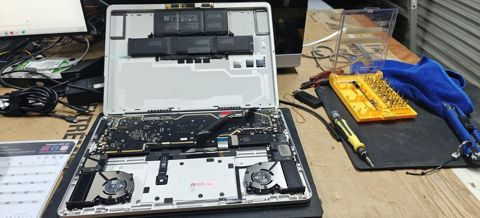
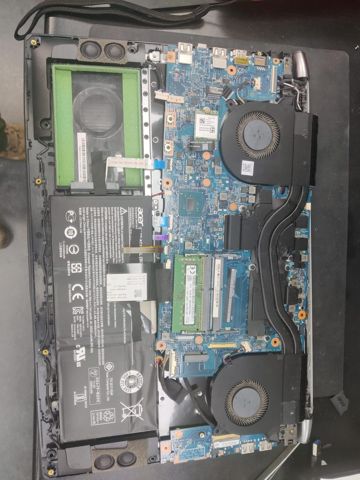
Insurance reports: work in the workshop
Serving Mount Druitt and 12km around
Ready to get it fixed?
Book online in two minutes or call us. $274 fixed labour, diagnosis included.